
______________________________________________________________________
The Master Report provides over 25 data points for a Student. Please give VIAS time to export data to the report. This report can take up to 1 - 5 minutes to download. Please remain patience with the system.
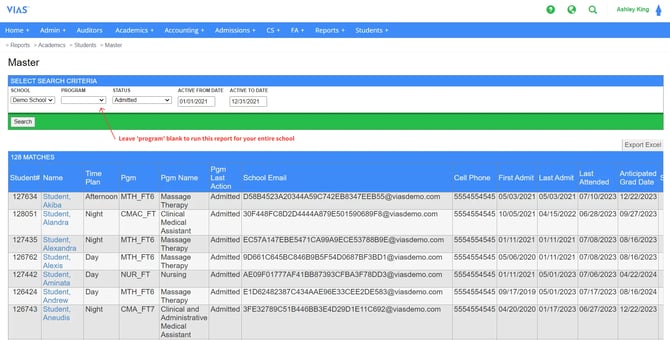
After running the Master Report, the resulting student list will provide the following information:
- Student #
- Name
- Time Plan
- Program Code
- Program Name
- Program Last Action
- School Email
- Cell Phone Number
- First Admit Date
- Last Admit Date
- Last Date of Attendance
- Anticipated Graduation Date
Note: When exported to Excel, the Master Report yields many more data points. A full list of all data points provided by the Master Report can be found at the end of this article.
To use the Master Report:
-
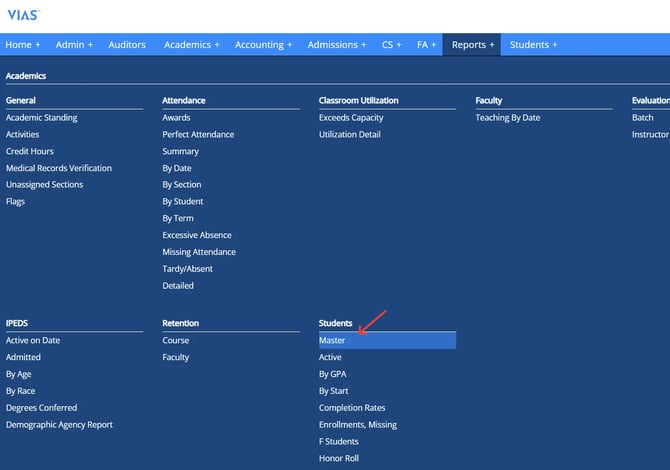
Go to Reports > Students > Master
-
Choose the School.
-
Choose the program you want to focus on (or leave it blank to search all programs)
-
Choose a status. These are program actions such as admitted, withdrawn, or graduated. (This can be left blank to pull all statuses)
-
Type in a date range.
-
Click Search.
All data points found on the Master Report:
| Data Point | Visible in VIAS | Visible in Excel |
| Time Plan | X | X |
| Program Code | X | X |
| Program Name | X | X |
| Last Action | X | X |
| Student # | X | X |
| Name | X | X |
| School Email | X | X |
| Personal Email | X | |
| First Admit | X | X |
| Last Admit | X | X |
| Last Attended | X | X |
| Anticipated Grad Date | X | X |
| Withdrawal Date | X | |
| Cell Phone | X | X |
| Home Phone | X | |
| Gender | X | |
| DOB | X | |
| Credit Hours Attempted | X | |
| Credit Hours Earned | X | |
| GPA | X | |
| Determination Date | X | |
| Race | X | |
| Ethnicity | X | |
| Immigration Status | X | |
| Prior Education | X | |
| SSN | X |