
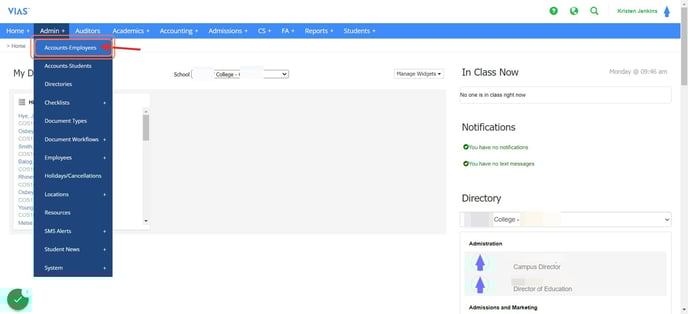
- Navigate to Admin -> Accounts-Employees
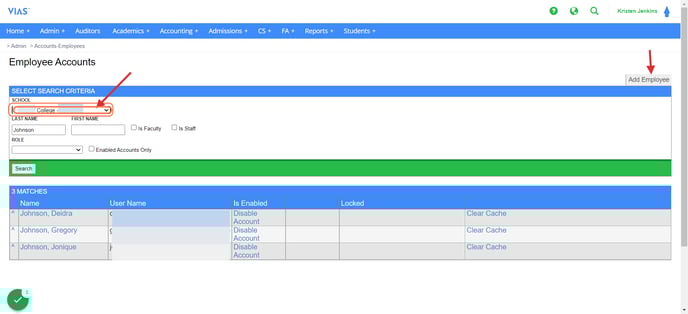
- Select your Campus and Click on 'Add Employee'
- Input the following required fields (More information may be added, the following is a list of what is required to create an account, also shown in the image below):
Last Name
First Name
Gender
Work email - This email will serve as the employee's username for VIAS. One email preference must be selected; using a work email is recommended, but a home email may also be chosen.
Email Address
School (Campus)
Job Title
Staff or Faculty - Check one or both options. Choosing faculty grants the role of instructor and adds the employee to the faculty list.
Employee Status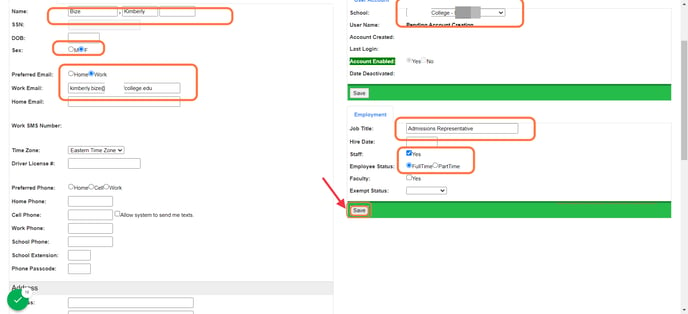
- Click 'Save'. After saving VIAS will send an automated email to the new users email address with a temporary password.
- IMPORTANT: The user account has been created, but the users roles still need to be defined. Click here to access the 'How to add roles to employee accounts' article for step-by-step instruction